There is a conversation that happens in property management offices across Dubai every single month, and everyone involved dreads it.
A landlord calls. Or WhatsApps. Or, if things have been quiet for too long, sends a pointed email with no greeting. The message is some version of the same question: how is my property doing? What is the occupancy? What came in this month? What went out?
The property manager, who is in the middle of coordinating three maintenance jobs, a lease renewal, and a tenant dispute about a parking bay, now has to stop everything and build a report from scratch. Open the contracts module. Open the income tracker. Open the expense tracker. Pull the occupancy numbers. Paste everything into Excel. Calculate profit. Format it. Double-check the numbers. Send it.
Two to three hours, every month, per landlord. Multiplied by however many landlords are in the portfolio.
ADDA ARM’s Landlord Summary Report was built to end this cycle entirely.
Why Property Managers in Dubai Are Still Spending Fridays Building Reports in Excel
Without a system like ADDA Rental Management, every month, property managers would be extracting data from four different Excel sheets, reconciling the numbers, building a summary, and sending it out manually to Landlords.
If they managed five landlords, that was five separate reports. Ten landlords, ten reports. And because each one was assembled by hand from different sources, the chance of a miscalculation, a copy-paste error, or a number pulled from the wrong period was never zero.
The problem scales badly. A property management firm handling 20 landlords across 200 units is not doing 20 reports a month — they are doing 20 reports plus all the follow-up calls when a number looks different from last month, plus the explanation of why Q1’s figures look unusual because of the maintenance cycle, plus the re-send when the PDF did not come through properly.
It is not a reporting problem. It is a systems problem.
How Do Manual Landlord Reports Impact a Property Manager’s Time and Workflow?

Nour manages a portfolio of 60 units across two buildings in Dubai for eight different landlords. She has been in property management for seven years and is, by any reasonable measure, excellent at her job. Tenants renew. Vacancies fill quickly. Maintenance gets handled before it becomes a complaint.
What Nour is less excellent at, through no fault of her own, is the last week of every month.
That is when the landlord reports are due. Each of her eight landlords expects a monthly summary: how many units are occupied, how much rent came in, what was spent on maintenance and utilities, and what the net position looks like. A few of them have started asking for a unit-by-unit breakdown as well.
Nour’s process is this: she opens multiple excel sheets, and sometimes her accounting tool as well to pull data around occupancy, collections, expenses; then she builds a pivot table in Excel to get the profit per unit, then she creates a separate tab for each landlord with only their units, then she formats it, checks it, converts it to PDF, and sends it from her email with a cover note written fresh each time.
For eight landlords, this takes her between two and three hours per report. Fifteen to twenty hours a month, every month, without variation. If she goes on leave, it doesn’t happen. If she is sick the last week of the month, someone has to be briefed on her Excel system, which nobody else fully understands.
The landlords themselves have a separate frustration. Marwan Al Farsi, who owns six units across Nour’s two buildings, has received his monthly summary in a different format three times in the past six months. None of them looks the same. He keeps them in a folder on his desktop, but comparing January to March requires reading two different layouts and hoping he is looking at the same numbers. When he wanted to make a decision about whether to revise the rent on two of his units, he had to call Nour and ask her to pull the last six months’ performance. She did it, but it took her an afternoon.
Marwan is not unreasonable. He does not enjoy calling. He would much rather have a consistent report that arrives on the first of every month without him having to ask for it.
How Does ARM’s Landlord Reports Feature Work for Property Managers?
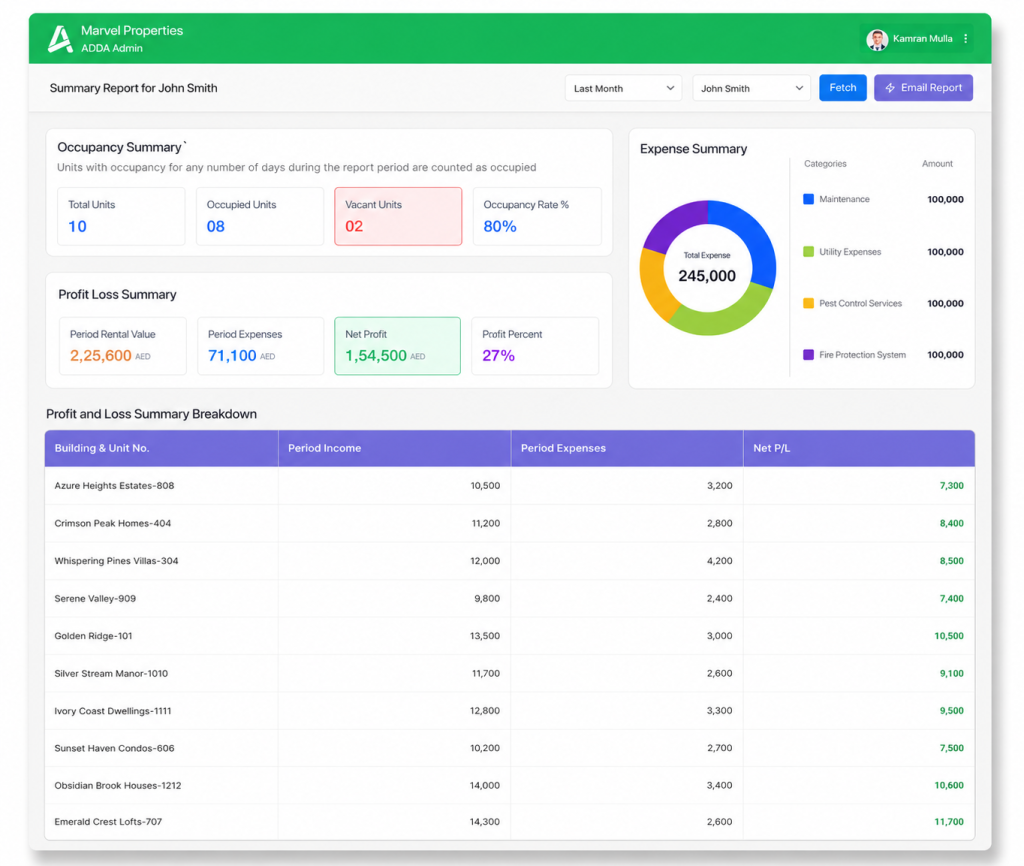
The feature has a straightforward premise: take all the data that exists in ADDA ARM, consolidate it automatically for the landlord, generate a structured report, and send it to the right person, again automatically, at the right time, without the property manager having to build anything by hand.
Here is how it works in practice.
For the property manager: Nour selects a landlord and a time period in ADDA ARM. The system pulls all relevant data across that landlord’s units — occupancy, rental income, expenses, profit/loss — and generates a consolidated summary report automatically. She can preview it, download it, or email it directly from the system in one click. She can also set up automated monthly or quarterly sends so the report goes out on the first or last day of every month without her having to log in and trigger it.
For the landlord: Marwan receives a structured PDF on the first of every month. Same format, every time. It covers:
- Occupancy summary: total units, occupied units, vacant units, occupancy rate.
- Portfolio performance — rental value for the period, expenses, net profit, profit percentage.
- An expense summary broken down by category with a chart.
- A profit and loss breakdown per unit, sorted from highest to lowest net P/L.
- Active contracts with start dates, end dates, and contract values.
- And if any units are vacant, a vacant unit summary showing how long they have been unoccupied and the last move-out date.
The report lands in his inbox. He reads it. He has the information he needed. He does not need to call Nour.
What Changes When Property Managers Automate Monthly Landlord Reporting?
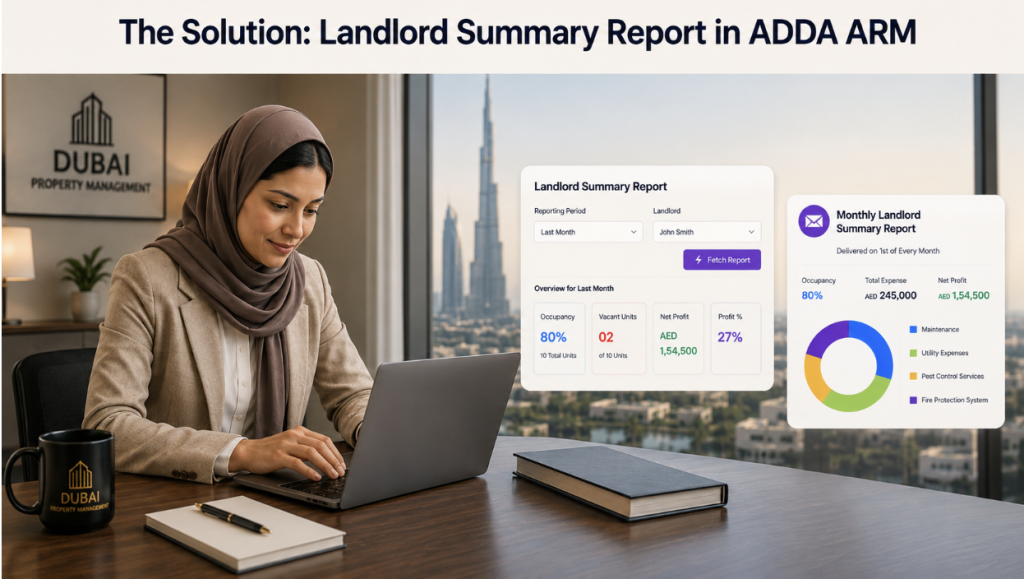
Automated Landlord reports saves many valuable hours for Nour every week
The last week of the month does not disappear; there are still renewals to process, maintenance jobs to close out, and the tenant in Building B who is always late on his utilities. But the fifteen to twenty hours of manual report building are gone.
The automated email schedule is set once. On the first day of the month, Marwan gets his report. So do the other seven landlords. Each report covers only their units, in a consistent format, with the correct numbers pulled automatically from the system.
When Marwan calls in February and asks how his units performed in Q4 2025, Nour opens ADDA ARM, selects his name, selects the date range, and fetches the report. It takes two minutes. The data is accurate because it came from the system, not from a spreadsheet assembled under time pressure.
She does not need to brief anyone on her Excel system when she goes on leave. She does not need to rebuild the report from scratch if a landlord asks for a different period. She does not need to reconcile figures that looked different between the income tab and the contracts tab because she pulled them on different days.
The Real Benefits of Automating Landlord Reports
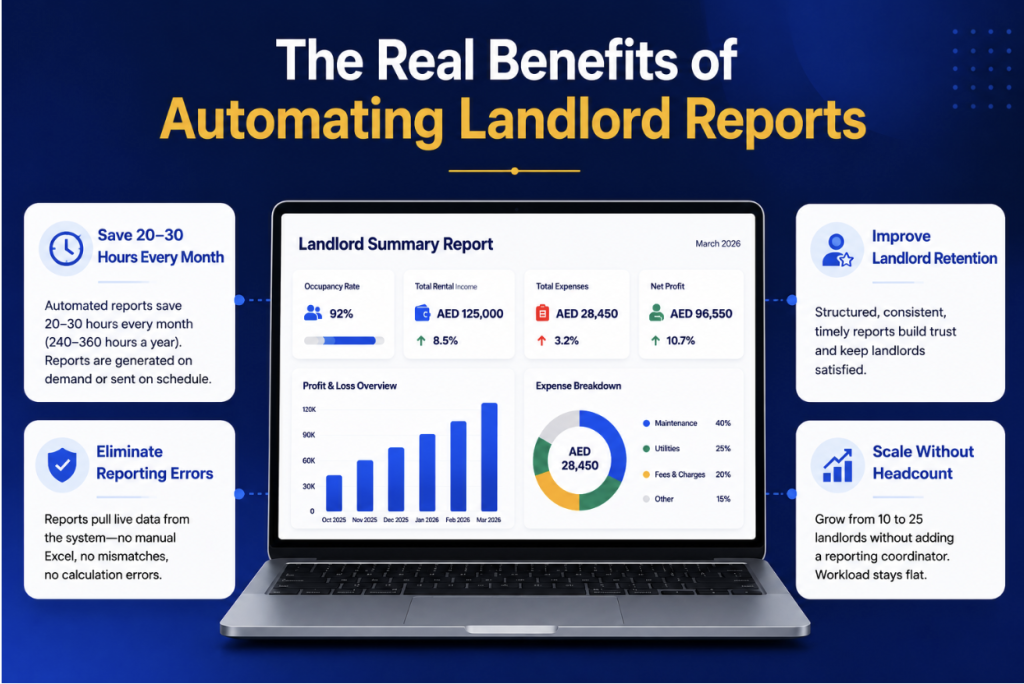
The impact is straightforward to calculate.
Time reclaimed from manual reporting: At an average of two to three hours per landlord report, a property manager handling 10 landlords spends 20 to 30 hours every month building reports. Over a year, that is between 240 and 360 hours — ten to fifteen full working weeks — spent assembling data that already existed in the system. With automated Landlord Reports, that time drops to near zero. Reports are generated on demand or sent automatically on schedule.
Error rate eliminated: Manual data extraction across multiple excel sheets and systems, assembled in Excel, carries a consistent risk of calculation errors and data mismatches. In landlord portfolios where profit and loss figures directly influence landlord decisions, rent revision, contract renewal, property investment, a calculation error in a monthly report is not just an inconvenience. It is a credibility issue. Automated reports pull live data from the system, so the figures in the report are the same figures in the accounts, every time.
Landlord retention: Landlords who receive structured, consistent, timely reporting are landlords who stay. In Dubai’s property management market, where portfolios change hands and property owners have no shortage of management options, the quality and regularity of financial reporting is one of the clearest differentiators between a management firm a landlord trusts and one they eventually move away from. A monthly report that arrives without being requested is a concrete, visible demonstration of operational discipline.
Scalability without headcount: A property management firm that wants to grow from 10 landlords to 25 landlords without adding a reporting coordinator is not going to get there on manual Excel reports. With automated Landlord Reports, the reporting workload does not increase linearly with the number of landlords. It stays flat.
What Does a Landlord Report Include in Property Management Software?
The Landlord Summary Report consolidates everything a landlord needs to assess their portfolio’s performance for a given period.
- Occupancy summary — total units under management, occupied units, vacant units, and occupancy rate for the reporting period. A unit is counted as occupied if it had tenancy for any number of days during the period.
- Profit and loss summary — period rental value, total period expenses, net profit, and profit as a percentage of rental income.
- Expense summary — a breakdown of expenses by category with a donut chart, so a landlord can see at a glance whether the maintenance line is running high relative to other costs.
- Profit and loss breakdown per unit — a table showing each building and unit number, the period income, period expenses, and net P/L, sorted from highest to lowest. This is the view that lets a landlord identify which units are performing well and which need attention.
- Contract summary — all active contracts within the reporting period, with unit type, start date, end date, and contract value. Sorted by upcoming end date so the landlord can see which tenancies are approaching renewal.
- Vacant unit summary — if any units are unoccupied, the report shows how many months they have been vacant and the last move-out date. If there are no vacant units, this section does not appear.
The report is generated as a formatted PDF, downloadable from the system and emailable directly to the landlord from within ADDA ARM.
How Do Landlord Reports Connect with Contracts, Income, and Expense Tracking?
The report does not require any parallel data entry or separate setup. It draws directly from the modules that property managers use: contracts, income tracker, and expense tracker. Any data that has been entered into the system is reflected in the report.
The automated email schedule is configured under Contracts → Setup → Landlord Summary Email. The property manager selects whether to send on the first or last day of each month, customises the email body, and saves. From that point, the system handles distribution. A log of all sent emails is accessible via Show Logs for audit and reference purposes.
For portfolios where landlord ownership is set at the property level rather than the unit level, the report consolidates accordingly — the landlord drop-down will reflect property-level landlords rather than unit-level. Both configurations are supported.
Is It Time to Automate Monthly Landlord Reporting in Property Management?
Property management in Dubai is a demanding enough role without a recurring fifteen-to-twenty-hour monthly task that adds no operational value and exists only because the system was not designed to do it automatically.
The data exists. The relationships with landlords exist. The only thing that was missing was a system that put them together.
With ADDA ARM’s Landlord Summary Report, Marwan’s report lands in his inbox on the first of every month. He has the occupancy figures, the income, the expenses, the profit, and the unit-level breakdown without asking for any of it. He can track trends over time because every report looks the same. He can make decisions about rent revision or renewal from his phone on a Sunday morning without calling anyone.
And Nour’s last week of the month looks like every other week of the month.
That is what the feature does. It takes a problem that has been solved manually for years and gives it to the system instead.
ADDA ARM is available to property management companies and operators across the UAE. To see Landlord Reports or any other ARM feature in action, reach out to the team.
Trusted by property operators across the UAE since 2017. Named clients include Expo Village and Dubai World Trade Centre. Gartner Category Leader 2025. World Realty Congress Gold 2024–25.
Frequently Asked Questions
Does the report cover all of a landlord’s units across multiple buildings, or does it need to be generated per building?
The report consolidates all units belonging to a landlord across all buildings within the selected period. If Marwan owns three units in Building A and three in Building B, one report covers all six. The profit and loss breakdown table shows each unit individually so he can see the performance of each one.
Can the property manager customise what the automated email says before it goes to the landlord?
Yes. The email body is editable under the Landlord Summary Email setup screen. The property manager can write a custom message that goes out with every automated report. The report itself attaches automatically — the PM does not need to generate and attach it manually.
What happens if there are no expenses recorded for a landlord’s units in a given month?
If no expenses exist for the reporting period, the expense summary section shows a “No Expense Yet” state rather than a blank or broken chart. The profit and loss figures will reflect zero expenses, and the net profit will equal the rental income for the period.
Can the property manager generate a report for a custom date range, or is it limited to monthly and quarterly?
The report can be generated for any time period selected — last month, last quarter, half-yearly, or a custom range. Automated scheduled sends are monthly, but manual generation is available for any period on demand.
If a landlord asks for the last six months’ performance, does the PM need to generate six separate reports?
No. The PM selects the landlord, sets the date range to cover the full six months, and fetches one consolidated report for that period. All metrics — occupancy, income, expenses, profit — are calculated across the entire range.
How does the system determine occupancy for the reporting period?
A unit is counted as occupied if it had active tenancy for any number of days during the report period. This is noted clearly on the report itself so there is no ambiguity for the landlord about how the occupancy rate was calculated.
Is the report accessible to the landlord directly, or does it always go through the property manager?
Currently, the report is generated and sent by the property manager — either manually on demand or via the automated monthly schedule. The landlord receives it by email. Direct landlord portal access to reports is not part of the current feature scope.
What if the property manager wants to send the report to multiple contacts for the same landlord?
The report is sent to the email address on record for that landlord in the system. For landlords who want reports copied to an accountant or family member, the PM can include additional recipients in the email body or manage this through the landlord contact details setup.