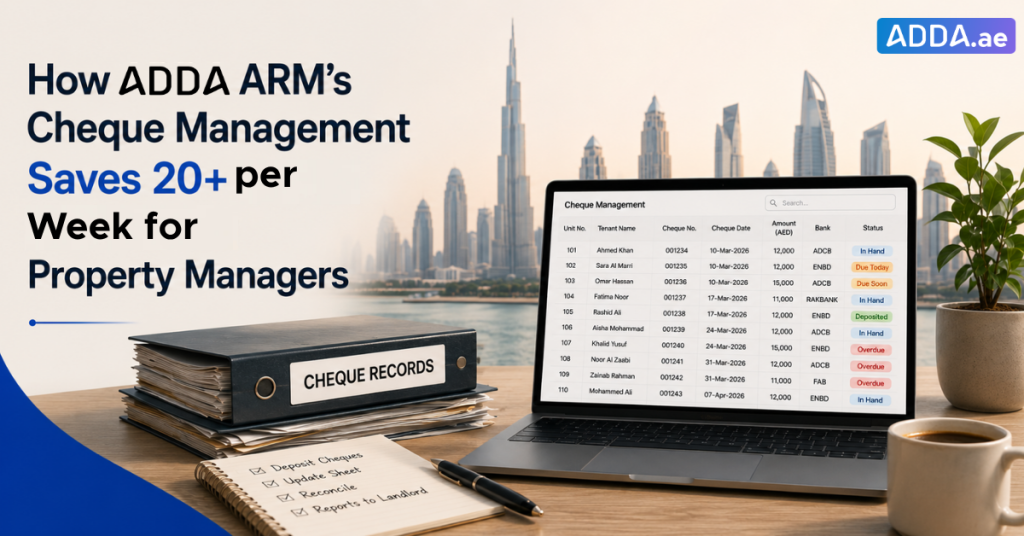
Every property manager in Dubai has a version of the same spreadsheet. Columns for unit number, tenant name, cheque number, cheque date, amount, bank name, and status. Maybe a remarks column. It gets updated when someone has time to update it.
This spreadsheet is doing a job it was never designed to do. Excel works well for analysis. It does not work well for tracking 600 time-sensitive financial instruments across 150 tenancies (for say a 150-unit portfolio of rental properties). Because it does not alert you when something is due, or help you in automatically generating landlord reports on a Friday afternoon when there are seventeen other things on the list.
And yet, for most property management offices in the UAE, the spreadsheet is the system.
ADDA ARM’s Cheque Management feature exists specifically to replace it. A live dashboard that already knows what needs depositing today, what’s overdue, what bounced, and what your landlord is about to call you about.
Why Dubai’s Property Managers Are Still Running on Spreadsheets in 2026
The cheque system is a feature of Dubai’s rental market. Tenants hand over post-dated cheques upfront, one per quarter is standard, so four cheques per tenancy per year, sometimes running to 6 or even 12 cheques for a year. And the property manager takes on the operational responsibility of depositing each one at exactly the right time.
For a building of 20 or 30 units, a spreadsheet and a physical folder work fine. For a 150-unit building, that is 600 cheques a year. Around 50 cheques coming due every month, and 12 to 15 cheque dates in any given week, each one requiring the right piece of paper to be located, taken to the bank, and correctly logged back in the sheet.
The spreadsheet tracks this in theory. In practice, it tracks what someone remembered to update. Property managers are not sitting at their desks maintaining spreadsheets — they are handling a maintenance contractor who has not shown up, a tenant whose water heater has been “almost fixed” for two weeks, and a landlord who wants to know why his this quarter’s collections look different from last quarter.
Manual entry means errors.
- A cheque date entered as 03/04 instead of 04/03.
- A status column that still says “In Hand” two days after the cheque was deposited.
- A formula counting deposited cheques in one sheet that does not talk to the realised column in another.
None of these is catastrophic in isolation. But accumulated across 600 cheques and 52 weeks, they become the reason a property manager cannot confidently answer a landlord’s question without spending 45 minutes cross-referencing two tabs and a physical folder first.
What goes wrong when rental cheques are tracked using spearsheets?
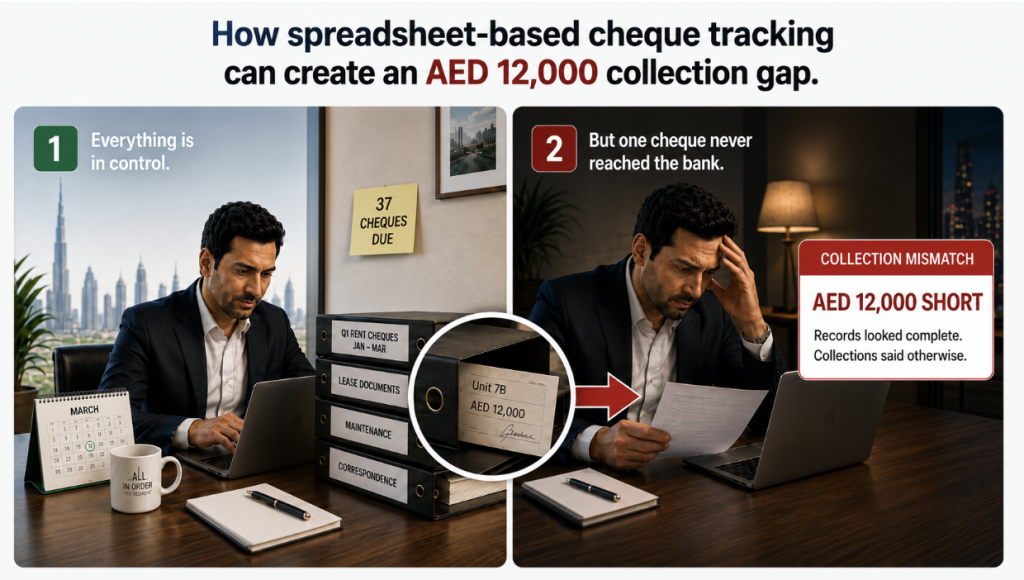
Ashraf manages a 150-unit residential building in Dubai. He has been in property management for over a decade. His spreadsheet is well-maintained, his folders are labelled, and he does a folder check every Monday and Thursday.
March in Dubai property management is a particular kind of busy. Lease renewals from January tenancies are hitting their first crunch point. Q1 collections are due. Maintenance backlogs are clearing. Somewhere in the middle of all this, 37 cheques are due for deposit across Ashraf’s building in a single month.
Ashraf’s spreadsheet shows 37. But between a formula that was pulling from the wrong column and a status entry that was updated wrongly, what he actually reads off the sheet that week is 36. He pulls 36 cheques from the folders, makes the bank run, and closes out the week.
Unit 7B’s AED 12,000 cheque, Q1 rent, dated 10 March, is still sitting in the folder.
He does not find out until end-of-month reconciliation, when the total collection figure comes in AED 12,000 short of what it should be. He goes back to the spreadsheet. Everything looks accounted for. He checks the bank statement. Still short. It takes him the better part of an afternoon, cross-referencing the spreadsheet against the folder, row by row, before he spots that Unit 7B never got deposited.
By this point, the cheque date has passed. He now has to approach the tenant for a fresh cheque, explain to the landlord why March’s collections are less, and account for a gap that his own records technically did not show.
The frustrating part is that the cheque was there the whole time. In the folder, exactly where it should have been. The system just did not tell him it was missing.
How does an online cheque management system help property managers?
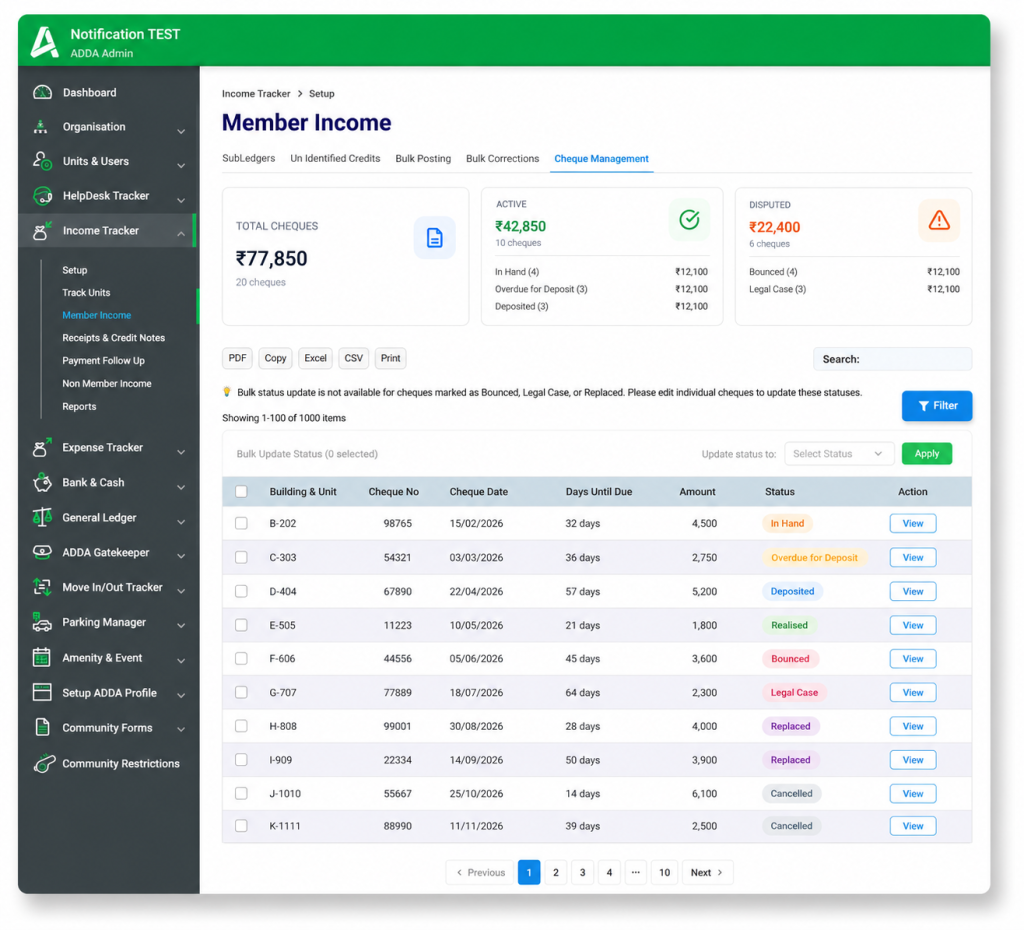
The core difference between a spreadsheet and ADDA ARM’s Cheque Management is not a list of features. It is orientation.
A spreadsheet records what has happened — updated when someone updates it, accurate only to the last time someone checked. It holds information and waits for you to come to it.
- The Cheque Management dashboard tells you what needs to happen today. It updates automatically as cheques move through their lifecycle.
- When a payment schedule is created against a tenant’s contract in ADDA ARM, the cheques appear in Cheque Management automatically, pre-dated, pre-attributed to the correct unit, already in the system. No manual entry. No column to fill in.
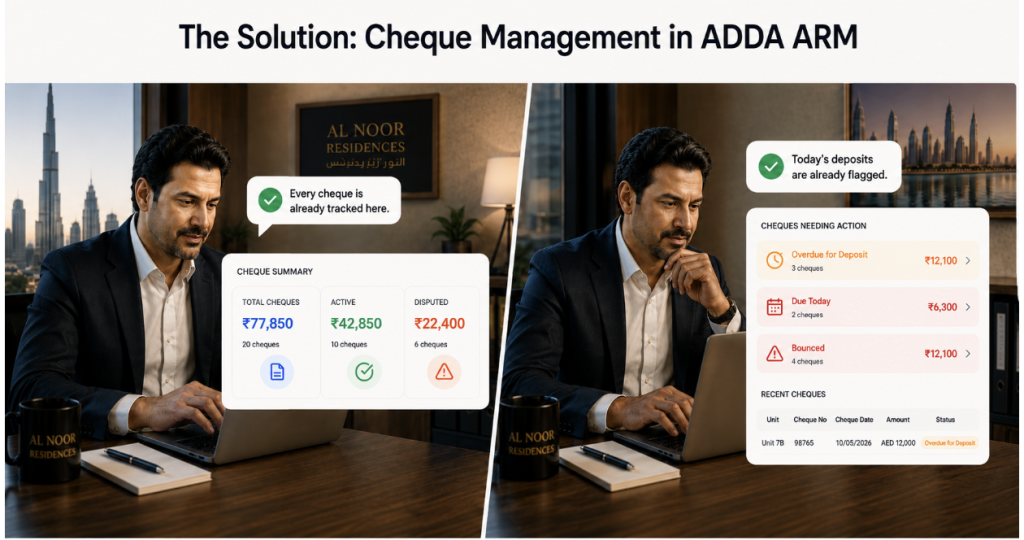
ADDA Cheque Management: No missing cheques, instant visibility into what needs action.
- As the deposit date approaches, the cheque’s status changes automatically from In Hand to Due for Deposit. Ashraf’s dashboard on the morning of 10 March shows him, without him asking, that Unit 7B’s cheque needs to go to the bank today. He also received an automated notification the previous evening. The system sends a reminder at 9 AM UAE time, one day before each cheque date, listing every cheque due the following day. On the morning of 9 March, Unit 7B was in Ashraf’s inbox. He saw it before anything else went wrong that day.
- The cheque goes in on the 10th. Ashraf logs it as Deposited, Bank GL, deposit date, done.
- When it clears, he marks it Realised. The AED 12,000 moves into the Bank GL. The landlord’s Q1 report reflects it correctly.
How Does Cheque Management Work Step-by-Step in ADDA ARM?
Every cheque in the system moves through a defined lifecycle. Each stage is either triggered automatically by a date, or updated by the PM with the right information captured at the right point.
In Hand — Cheque is received and logged against the contract. Default starting status. Date, amount, bank name, and tenant details are pulled from the contract automatically.
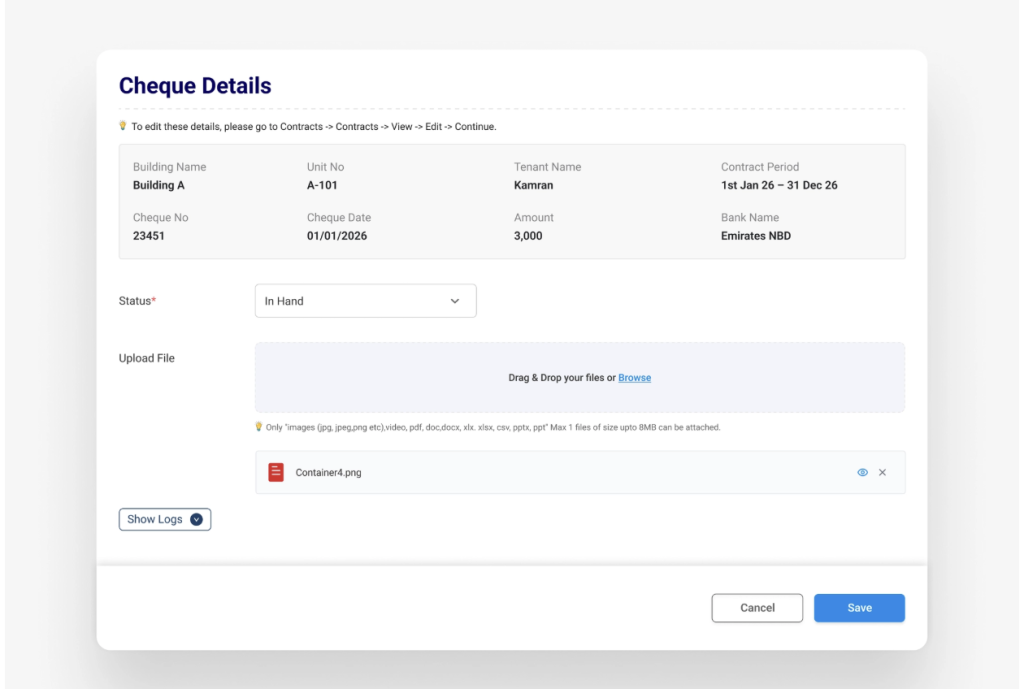
In-hand cheque in ADDA
Due for Deposit — On the cheque date, the status flips automatically. The PM’s dashboard already shows it without any manual update.
Deposited — PM marks it deposited, logs the Bank GL and deposit date. Income reflects in the unit’s account statement immediately — but not in the Bank GL yet. This is deliberate: income should only move into the bank accounts once it has actually cleared.
Realised — Cheque has cleared. PM marks it Realised. Amount moves into Bank GL. Landlord report updates.
Bounced — If a cheque comes back, the PM logs the bounce date and reason. The system tracks whether a penalty invoice has been raised and whether it has been recovered. All of this stays attached to the cheque record — not scattered across an email thread or a sticky note on a folder.
Replaced — Tenant provides a new cheque. It gets linked to the original, tracked as a new instrument, and runs through the full deposit flow again. The complete history of both cheques sits in one place.
Legal Case — For repeat situations, the PM can manually escalate to Legal Case status. All history remains intact and exportable.
The status transition rules are also enforced by the system. A cheque cannot go from Realised back to Deposited. A cheque cannot be marked Bounced before it has been Deposited. The logic a PM would apply manually, and occasionally get wrong at the end of a long day, is built into the workflow.
Benefits of Using Cheque Management Software in Property Management
A 150-unit building with 4 cheques per tenancy per year means 600 cheques in active circulation annually — roughly 50 due every month, 12 to 15 cheque dates every week.
Time reclaimed from spreadsheet maintenance: Keeping a cheque tracking spreadsheet current, updating statuses after bank runs, cross-referencing folder checks, correcting entry errors, reconciling discrepancies, takes the average property manager 30 to 45 minutes a day. That is 3.5 to 5 hours a week, or between 180 and 260 hours a year, spent maintaining a document rather than managing property. With Cheque Management, the dashboard updates itself. The Property Manager acts on what it shows.
Revenue protected from lapsed cheques: At a conservative average of AED 80,000 per unit annually across a 150-unit building, each quarterly cheque represents roughly AED 20,000. A cheque that lapses past its deposit window triggers a replacement cycle that typically runs 4 to 6 weeks. Even one lapsed cheque per quarter means AED 80,000 in delayed landlord collections annually.
Errors eliminated from manual entry: In a 600-cheque portfolio, a 2% manual entry error rate, a transposed date, a wrong status, a missed update, means 12 cheques a year with inaccurate records. Not every one of these causes a financial consequence. But in a dispute or an audit, a spreadsheet with inconsistent entries is not a document anyone wants to present.
Penalty revenue that stops slipping through: At a 3% bounce rate, roughly 18 cheques will bounce across this building in a year. In manually tracked portfolios, 1 in 6 bounced cheques does not result in a penalty invoice being raised, the follow-up gets lost. That is 3 invoices per year that should have been raised and weren’t. With Cheque Management, the bounce penalty workflow is triggered within the same status update. Nothing requires a separate follow-up to not forget.
Landlord reporting that takes minutes, not hours: Compiling a weekly cheque status summary, collections to date, pending deposits, cheques in dispute, currently takes a property manager two or more hours to assemble manually from the spreadsheet and folders. With Cheque Management, the Bounced Cheque and Replaced Cheque reports under Income Tracker are a one-click export. PDF, Excel, or CSV. The landlord gets the same quality of information regardless of how the rest of the week went.
How Does Cheque Management Integrate with Contracts, Payments, and Accounting?
Cheque Management is not a standalone module. It lives inside Income Tracker and is directly connected to the contracts and payment schedules already maintained in ADDA ARM.
- When a payment schedule is set up against a contract, cheques appear in Cheque Management automatically.
- When a cheque is marked as Deposited, a receipt is posted against it in Income Tracker.
- When it is marked as Realised, the Bank GL updates.
- When a receipt is reversed for a correction or cancellation in Income Tracker, the cheque status updates accordingly in Cheque Management.
The two move together.
The audit log captures every status change, every field edit, and every attachment — timestamped and attributed to the user who made it. When a landlord asks what happened with a specific cheque from eight months ago, the answer is a filter and a scroll, not a search through old emails and a folder that may or may not still be where it should be.
Is It Time to Replace Your Cheque Tracking Spreadsheet with a Dedicated System?
The spreadsheet is not the problem. It works for a lot of things, and it got many property management offices through years of growth. But 600 time-sensitive financial instruments, each with a hard deposit window and a direct line to a landlord’s rental income, is not something a manually updated document can manage without gaps.
ADDA ARM’s Cheque Management does not ask Ashraf to be more organised or more diligent. It asks him to act on what the dashboard shows him. The system holds the dates, sends the alerts, tracks the lifecycle, and maintains the records. Ashraf manages the building.
That is how it should work.
ADDA ARM is available to property management companies and operators across the UAE. To see Cheque Management or any other ARM feature in action, reach out to the team.
Trusted by property operators across the UAE since 2017. Named clients include Expo Village and Dubai World Trade Centre. Gartner Category Leader 2025. World Realty Congress Gold 2024–25.
Frequently Asked Questions
Does Cheque Management replace our existing spreadsheet, or do we run both in parallel during transition?
Once your contracts and payment schedules are set up in ADDA ARM, cheques appear in Cheque Management automatically. There is no parallel running required and no manual migration needed. The spreadsheet becomes redundant from the point your next tenancy cycle begins in ADDA ARM.
What if a cheque date is wrong when it comes from the contract? Can the PM correct it?
Cheque details — date, amount, bank name — can be edited from the Cheque Details screen. Any change is logged against the user who made it, with the previous value retained in the audit trail.
Can we update multiple cheques at once after a bank run, or does each one need to be done individually?
Bulk status updates are supported. After a bank run, a PM can select all relevant cheques, apply the Deposited status in one action, and log the Bank GL and deposit date once for the batch. The system asks you to type the number of cheques you are updating before confirming — a deliberate step to prevent accidental bulk changes.
What happens to the Bank GL when a cheque is deposited but has not cleared yet?
Income reflects in the unit’s account statement as soon as a receipt is posted against a deposited cheque. It does not move into the Bank GL until the cheque is marked as Realised. Your books will not show bank income that has not actually cleared.
If a cheque bounces and the tenant provides a replacement, does the original cheque history disappear?
No. The original cheque stays on record with its full history — bounce date, reason, penalty invoice status. The replacement is linked to the original and tracked through its own deposit flow. When a landlord or auditor wants the complete payment history for a unit, both cheques appear together.
Who gets notified when a cheque bounces?
Both the property manager and the tenant receive an automated email immediately when a cheque is marked as Bounced. The PM gets an operational alert; the tenant gets a payment action request. These go out on status update, not on a batch cycle.
We manage multiple buildings across different landlords. Can a PM see all buildings in one view?
Access follows the same permission structure as the rest of ADDA ARM. A PM with access to multiple buildings sees all relevant cheques in a single dashboard, filterable by building, status, and date range. Per-landlord reports can be generated per building without switching between accounts.
What if a cheque has been marked as Realised but there is an error that needs correcting?
Once Realised, the status cannot be changed directly — this protects the integrity of confirmed income records. Any correction goes through a receipt reversal flow in Income Tracker, which keeps the audit trail complete and ensures no realised income disappears from the books without a corresponding reversal entry.