Mr. Khalid, an OAM team member, already has a lot on his plate.
But things become complicated when two residents end up booking the same space for the same time slot.
But how can this happen in a well-managed residential community?
It often happens when one physical space has multiple booking options.
Many residential communities across the UAE offer outdoor amenities that can be used in different ways.
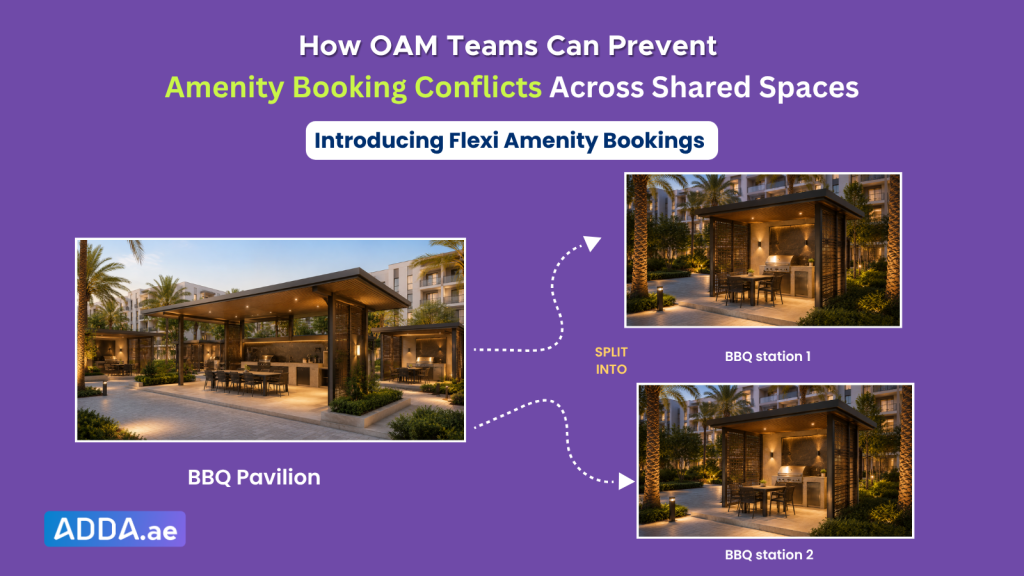
For example, a BBQ Pavilion may be available as one large booking space for community gatherings. The same area may also be divided into BBQ Station 1 and BBQ Station 2, allowing residents to book each space individually.
This flexibility helps communities make better use of their amenities while giving residents more booking options. However, it also creates a challenge for OAM teams.
When multiple booking options are linked to the same physical space, one booking can affect the availability of another. If this is not managed properly, overlapping reservations can happen, leading to confusion for the site team and frustration for residents.
To help community teams manage these shared spaces more effectively, ADDA has introduced Flexi Amenity Booking, a feature that automatically manages availability across linked amenities and helps prevent overlapping reservations.
How Booking Conflicts Occur in Shared Community Amenities
Let’s continue with Mr. Khalid’s weekend situation. A resident books BBQ Station 1 for a small family gathering. The booking is confirmed, and the resident starts planning the evening.
A few days later, another resident books the full BBQ Pavilion for the same date and time.
In the system, both bookings may look correct because they were made under two different amenity options. But on the ground, there is only one shared space.
On the day of the event, both residents arrive with valid booking confirmations. One has invited family. The other has called friends for a weekend barbecue.
Both believe the space is theirs. That is when the issue becomes bigger than a booking error.
Residents may have already had guests, arranged food, purchased supplies, or planned their weekend around the reservation. A last-minute conflict can quickly turn into frustration for residents and pressure for the site team.
Now Mr. Khalid has to check old booking records, speak to both residents, understand where the overlap happened, and find an alternative arrangement.
What should have been a simple amenity booking has now become an avoidable operational issue.
And as amenity usage increases across active communities, managing these shared-space dependencies manually becomes even more difficult.
The Impact of Booking Conflicts
Booking conflicts do not just affect amenity schedules. They also affect the overall resident experience.
For residents, it can be frustrating to find out that someone else has also booked the same space. Even though the issue is caused by overlapping booking options, it often comes across as a failure of the OAM team to manage amenity bookings properly.
For OAM teams, these conflicts create additional operational work. Instead of focusing on day-to-day community operations, they get pulled into resolving booking disputes, answering resident queries, and arranging alternative booking options.
Introducing Flexi Amenity Booking in ADDA
To avoid these last-minute booking conflicts and reduce the pressure on OAM teams, ADDA has introduced Flexi Amenity Booking.
Flexi Amenity Booking allows OAM teams to link amenities that share the same physical space, so availability is automatically updated across all connected booking options.
Once configured, ADDA understands which spaces are linked and updates availability accordingly.
For example:
- If a resident books the full BBQ Pavilion, the linked BBQ stations become unavailable for the same time slot.
- If a resident books BBQ Station 1, the availability of the full BBQ Pavilion is automatically updated.
- If there is no conflict, the remaining available spaces continue to stay open for booking.
This helps residents see availability that matches the actual space available on the ground.
For OAM teams, it reduces the need to manually check multiple bookings, compare time slots, or worry about overlapping reservations after a booking is confirmed.
Flexi Amenity Booking helps OAM teams:
Reduces Manual Coordination
OAM teams do not need to manually compare bookings made for the Full BBQ Pavilion, BBQ Station 1, and BBQ Station 2 to identify potential conflicts.
Avoids Double Bookings
When one linked space is booked, ADDA automatically updates the availability of the connected spaces. This helps the team maintain a more accurate booking schedule, even when amenity usage increases.
Enables Flexible Use of Shared Amenities
Communities can continue offering multiple booking options for the same space without creating additional complexity in the booking process.
Makes Booking Clear for Residents
Residents can book amenities with greater confidence, knowing that the availability displayed in the app reflects the actual availability of the space.
By automating the management of linked amenities, Flexi Amenity Booking helps community teams maintain accurate availability while making the booking experience more seamless for residents.
How to Configure Flexi Amenity Booking in ADDA
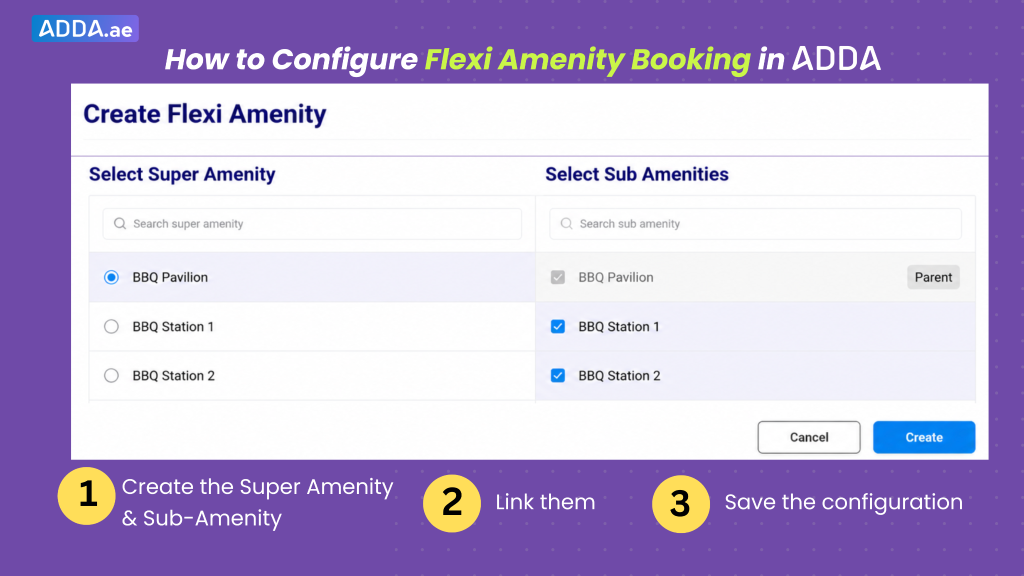
Setting up Flexi Amenity Booking is simple.
Navigate to:
Admin Portal → Amenity & Events → Setup
Then:
- Create the Super Amenity & Sub-Amenity
- Link them
- Save the configuration
Once configured, ADDA automatically manages availability across all linked spaces.
Communities can create multiple Flexi Amenity groups based on their amenity layouts and booking requirements.
Conclusion
Amenity booking should be simple for residents and easy for OAM teams to manage. With Flexi Amenity Booking, ADDA helps communities avoid overlapping reservations and keep shared-space availability clear.
This means fewer last-minute conflicts, less manual checking, and a smoother booking experience for everyone.
Enable Flexi Amenity Booking for your community. If you need any help, please contact our support team.
Well-run communities run ADDA.