September 2026 Edition
Welcome to the September edition of the ADDA UAE Product Update Digest—a quick look at the latest improvements across ADDA Rental Management, ADDA Community Management, ADDA Gatekeeper and the ADDA App.
From smarter portfolio visibility and automated finance workflows to faster gate operations and simpler resident journeys, here’s what’s new this month.
ADDA Rental Management
ADDA Rental Management brings contracts, collections, landlords, tenants, units and financial operations together in one connected platform.
Our latest updates focus on giving rental teams better visibility into their portfolios while reducing the manual work involved in managing them.
1. See Your Rental Portfolio in One Place with the New ARM Dashboard
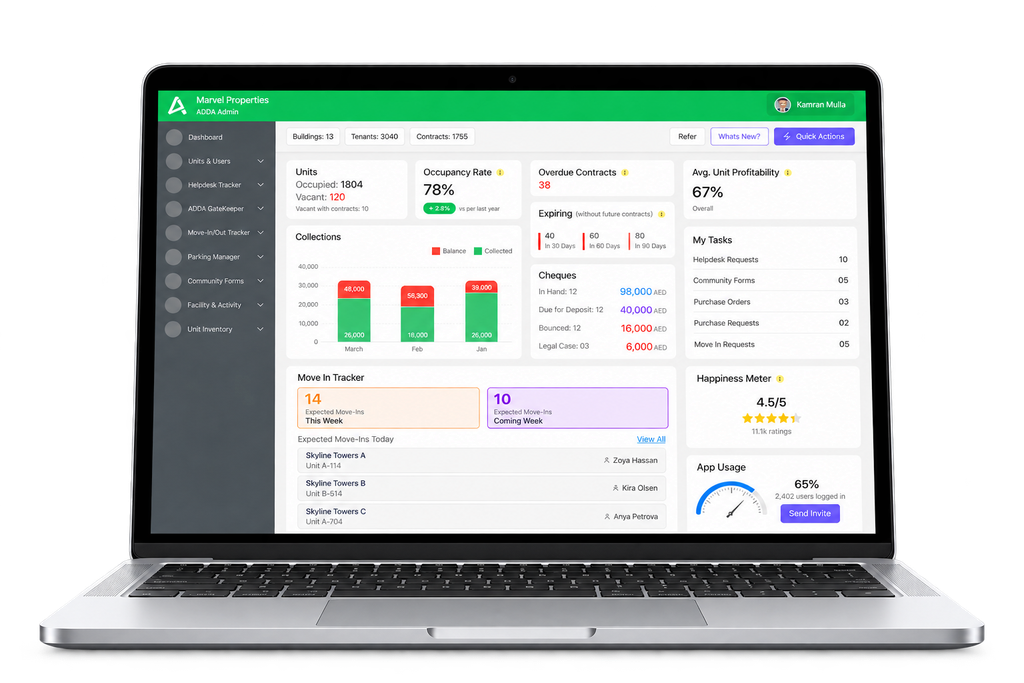
No more jumping between modules to understand what needs attention. The revamped ADDA Rental Management Dashboard brings occupancy, contracts, collections, cheque status, approvals and key operational activities into one centralized view—with drill-downs when you need the details.
Why it matters: Rental teams get a faster view of portfolio performance and time-sensitive actions, all from one place.
How can I use this?
Where: Admin Portal → Dashboard
Availability: Automatic | Admin setup needed: None
Product: ADDA Rental Management
2. Manage Rental Operations from Your Mobile
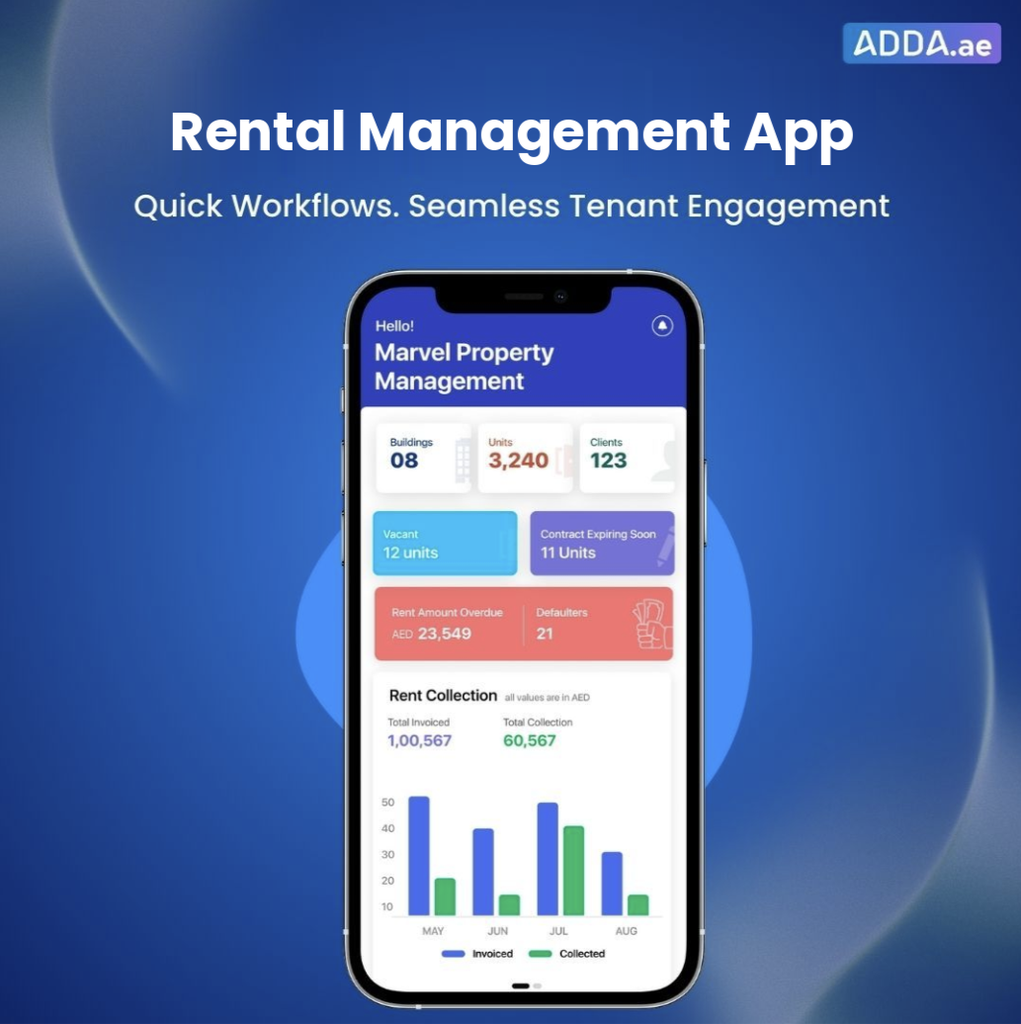
The ADDA Property Manager App puts important portfolio information in your pocket—from collections, overdue amounts and vacancies to contract expiries, properties, units, tenants and operational tasks. Pasted markdown
Why it matters: Property Managers can stay connected to their portfolio even when they’re away from their desks.
How can I use this?
Where: ADDA Property Manager App on the App Store and Play Store
Availability: Automatic | Admin setup: None
Product: ADDA Rental Management
3. Manage the Complete Cheque Lifecycle Digitally
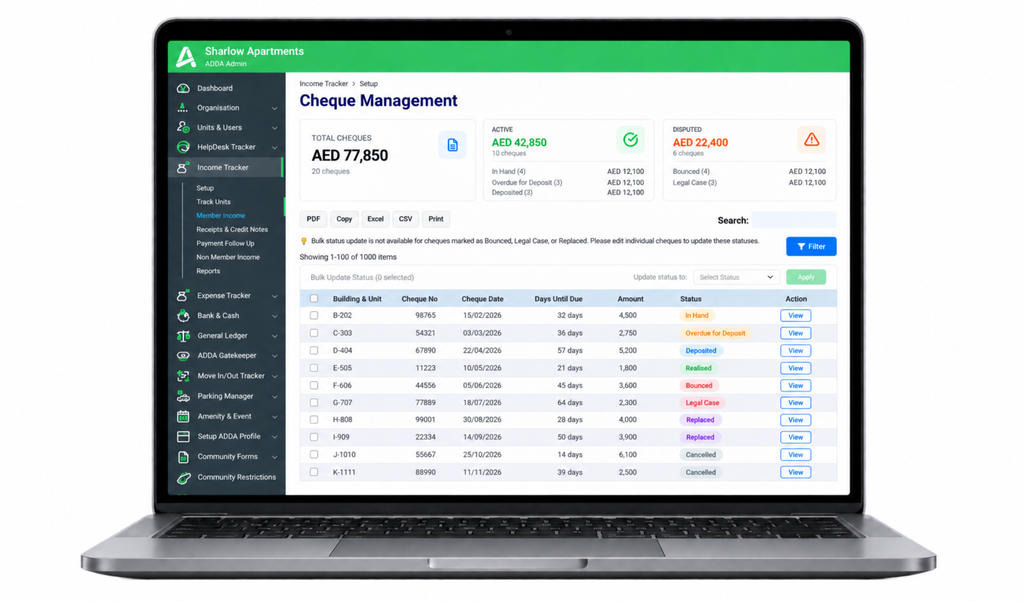
From an upcoming deposit to a bounced or replaced cheque, Cheque Management brings the complete PDC journey into one structured digital workflow—with dedicated reports to help teams stay on top of what needs attention. Pasted markdown
Why it matters: Less spreadsheet tracking, fewer missed deposit dates and better visibility across your cheque portfolio.
How can I use this?
Where: Income Tracker → Member Income → Cheque Management
Availability: Automatic | Admin setup: None
Product: ADDA Rental Management
4. Give Landlords a Complete Portfolio Summary
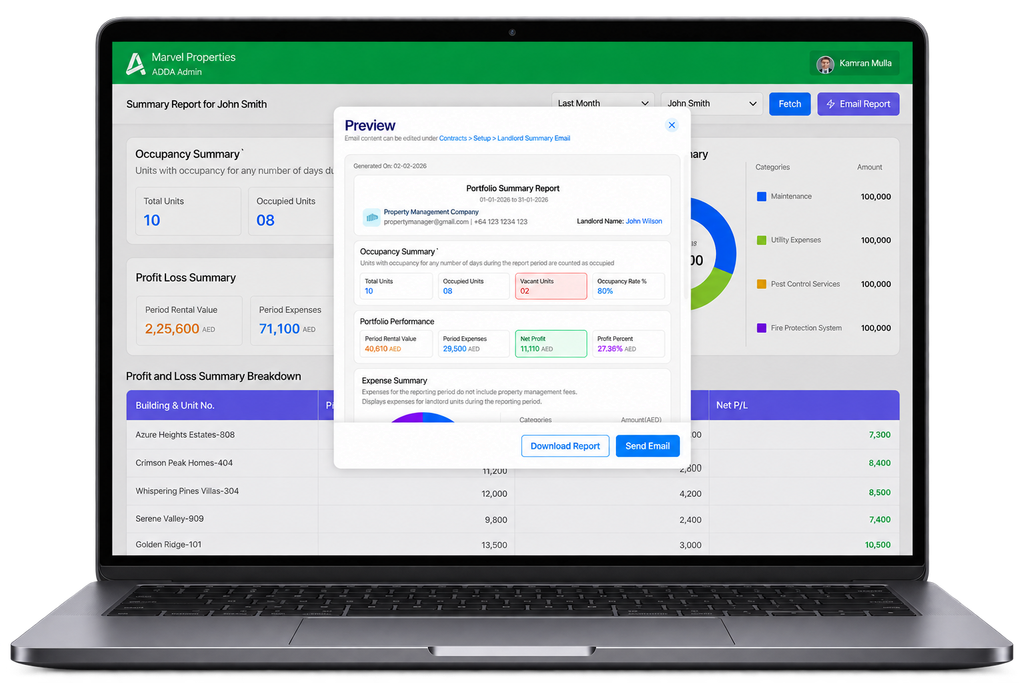
The Landlord Summary Report brings occupancy, rental income, expenses and overall portfolio performance into one consolidated view. It can be downloaded, emailed directly or even scheduled for automatic monthly delivery.
Why it matters: Regular landlord reporting becomes faster and more consistent—with less manual preparation every month.
How can I use this?
Where: Contracts → Reports → Landlord Reports → Landlord Summary Report
Monthly Emails Setup: Contracts → Setup → Landlord Email
Availability: Automatic | Admin setup: Required only for automated emails
Product: ADDA Rental Management
5. New Unit Occupancy & Contract Details Reports
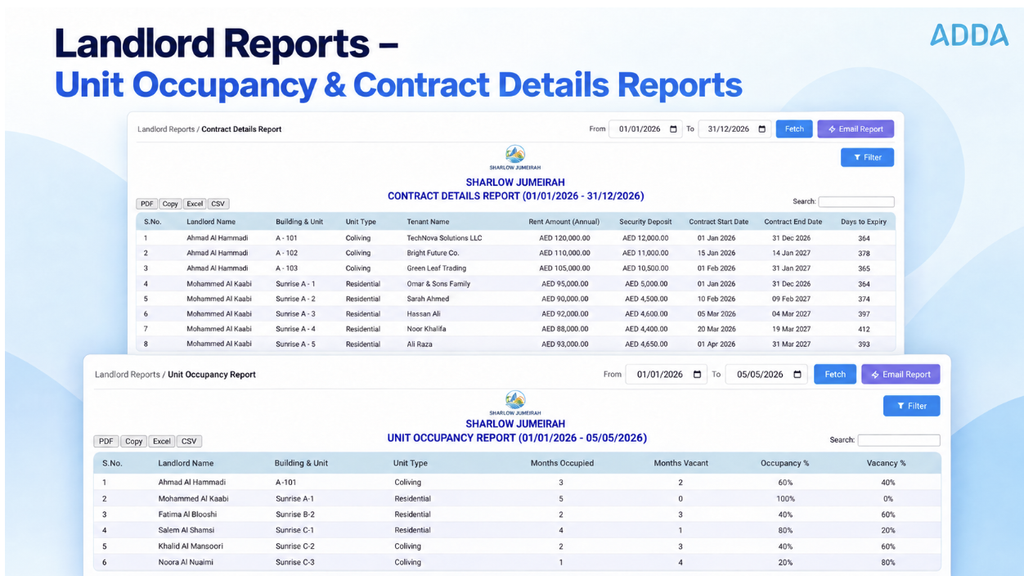
Need a quick answer on which units are occupied, vacant or currently leased? New Unit Occupancy and Contract Details reports provide ready-to-use information with filters for landlord, unit, building and unit type.
Why it matters: Common landlord queries can be answered quickly without building separate Excel reports.
How can I use this?
Where: Contracts → Reports → Landlord Reports
Reports: Unit Occupancy Report / Contract Details
Availability: Automatic | Admin setup: None
Product: ADDA Rental Management
6. Understand Profitability at Unit Level
Expenses can now be tagged or split across individual units. Combined with new Expenses by Unit, Unit-wise GL and Unit-wise Profit & Loss reports, teams get a much clearer view of the true financial performance of each unit.
Why it matters: See not just what a unit earns,but what it actually costs and how profitable it is.
How can I use this?
Where: Expense Tracker → By Vendors → Create Invoice
Reports: Expenses by Unit / Expense GL Heads (Unit-wise) / Unit-wise P&L Summary
Availability: Automatic | Admin setup: Tag units while posting expenses
Product: ADDA Rental Management
7. Never Miss an Emirates ID or Passport Expiry
ADDA now automatically reminds Property Managers 30 days, 7 days and 1 day before stored Emirates ID and Passport expiry dates.
Why it matters: Follow up on expiring documents early instead of discovering them during a lease renewal.
How can I use this?
Where: Units & Users → Approved Users → Edit Profile → Advance Information
Availability: Automatic based on stored expiry dates | Admin setup: Keep expiry dates updated
Product: ADDA Rental Management
ADDA Community Management
ADDA Community Management brings resident services, communication, amenities, finance, procurement, forms and reporting together for community and OAM teams.
The latest improvements focus on reducing repetitive administration while helping communities deliver better resident experiences.
1. Turn Resident Feedback into Better Service
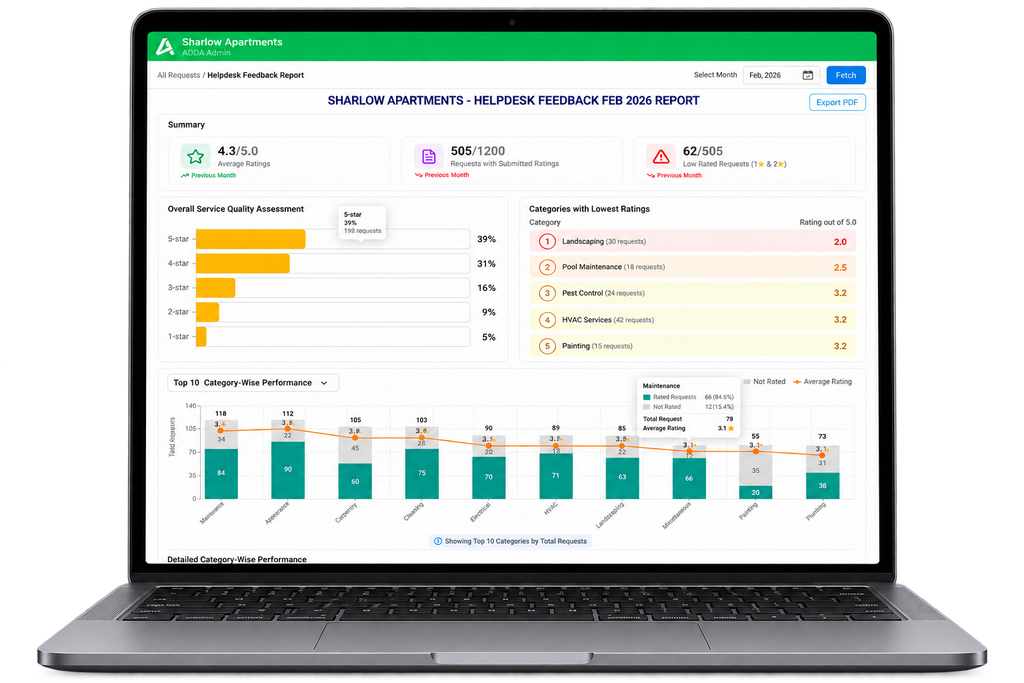
The new Helpdesk Feedback Report brings resident ratings, service-category performance, vendor performance and sentiment into one centralized view.
Why it matters: Move beyond individual ratings and turn resident feedback into actionable service insights.
How can I use this?
Where: Helpdesk Tracker → Reports → Helpdesk Feedback Report
Availability: Automatic | Admin setup: None
Product: ADDA Community Management / ADDA Rental Management
2. Manage Shared Amenities Without Booking Conflicts
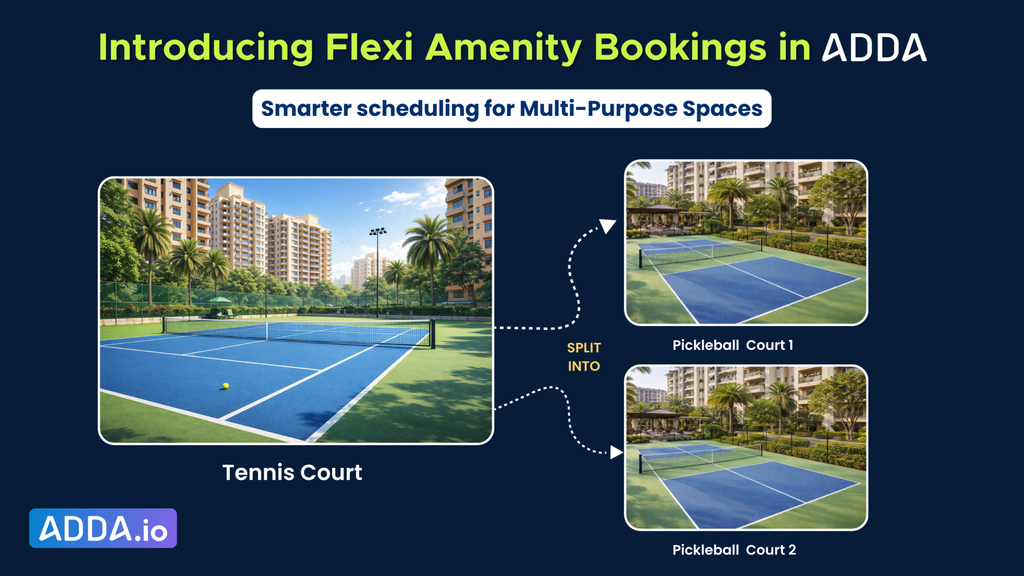
With Flexi Amenity Bookings, admins can connect a Super Amenity with multiple Sub Amenities, and ADDA automatically coordinates availability across the shared spaces.
Why it matters: Flexible spaces can be offered without worrying about overlapping or conflicting reservations.
How can I use this?
Where: Amenities & Events → Setup → Add Flexi Amenity
Availability: Automatic | Admin setup: Group applicable slot-based amenities into Super and Sub Amenities
Product: ADDA Community Management / ADDA Rental Management
3. Automate Recurring Non-Member Income Invoices
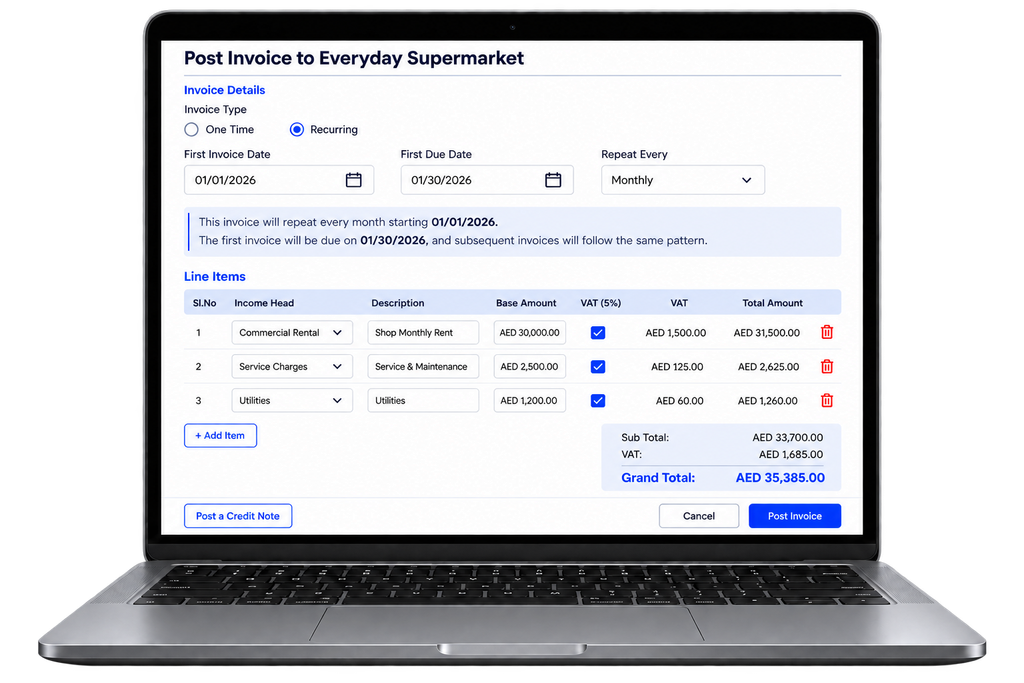
Monthly ATM rent? Shop rental? Advertising-space charges? Configure the recurring invoice once and ADDA can automatically generate the next invoices based on the selected frequency.
Why it matters: Turn repetitive monthly invoice creation into a set-it-once workflow.
How can I use this?
Where: Income Tracker → Non-Member Income → Post Invoice
Availability: Automatic | Admin setup: Configure the invoice and frequency
Product: ADDA Community Management / ADDA Rental Management
4. Community Forms Are Now Easier for Residents—and More Flexible for Admins
4 a. Community Forms now support Number fields, Short Answer and Paragraph formats, character limits, retained formatting, Show on Permit, and more flexible permit sharing. Admins can even share a permit without exposing the resident’s entire submitted response. Why it matters: Cleaner forms for residents, more flexibility for admins and better control over what security teams see.
4. b. Changed an approver or minimum approval requirement? Pending Community Form responses now automatically follow the latest configuration too. Why it matters: No more pending requests stuck with outdated approvers after your approval structure changes.
4. c. Community Forms reports now separate Block and Unit into individual columns and add an Approved / Unapproved Form Status for applicable forms. Pasted markdown. Why it matters: Cleaner exports mean easier filtering and less Excel cleanup.
How can I use this?
Admin: ADDA ERP Admin Console > Community Forms
Residents: Community Forms in the Resident Portal or ADDA App
Availability: Automatic | Admin setup: Configure the required field and permit options
Product: ADDA Community Management / ADDA Rental Management
5. Send Purchase Orders to Multiple Vendor Contacts
Vendor records can now include multiple email IDs. When Email to Vendor is triggered, the PO can reach both primary and alternate vendor contacts.
Why it matters: A PO doesn’t have to get delayed simply because one vendor contact is unavailable.
How can I use this?
Where: Expense Tracker → By Vendor → Add/Edit Vendor
Availability: Automatic | Admin setup: Add alternate vendor email IDs
Product: ADDA Community Management / ADDA Rental Management
ADDA Gatekeeper
ADDA Gatekeeper helps communities digitize visitor movement and gate operations.
The latest updates are designed to make visitor processing faster for guards, improve the accuracy of visitor records and strengthen control over visitor access.
1. Meet the New ADDA Gatekeeper Global Portal
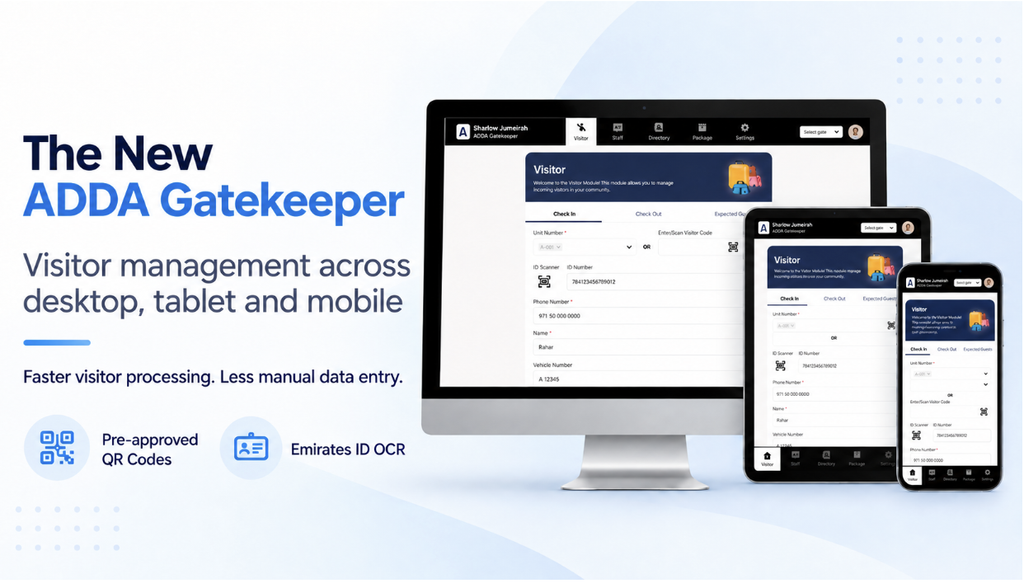
The new ADDA Gatekeeper Web Portal brings visitor workflows into a modern experience across desktop, mobile and tablet. Security teams can manage expected guests and scan pre-approved visitor QR codes—and for Dubai communities, Emirates ID OCR can automatically capture visitor information.
Why it matters: Faster visitor processing with less manual data entry and more flexibility for on-ground teams.
How can I use this?
Where: ADDA Gatekeeper → Launch ADDA Gatekeeper on Web / Gatekeeper Global App
Availability: Contact ADDA Support for activation | Admin setup: None
Product: ADDA Gatekeeper
2. Automatically Clean Up Forgotten Visitor Check-Outs
With Visitor Auto Check-Out, admins can set 1-Day, 2-Day or no-auto-checkout rules for different visitor categories. Reports also show whether checkout was completed by a guard or automatically by the system.
Why it matters: Cleaner visitor records with less manual cleanup for busy security teams.
How can I use this?
Where: Gatekeeper Setup → Auto Check-Out Visitors
Availability: Automatic | Admin setup: Configure rules by visitor category
Product: ADDA Gatekeeper
3. Automatically Expire Walk-In Visitor QR/Bar Codes
Walk-in QR/Bar Codes can now automatically expire based on the Duration in Hours configured for the visitor entry reason. Once the approved duration ends, the code becomes invalid on integrated access-control devices.
Why it matters: Visitor access automatically ends when the approved visit period is over.
How can I use this?
Where: ADDA Gatekeeper → Setup → Visitor Entry Reasons
Availability: Automatic | Admin setup: Configure Duration in Hours
Product: ADDA Gatekeeper
4. Access Incident Investigator with an OTP
Incident Investigator now lets authorized users request an OTP on their registered login ID instead of relying on a separate password. Pasted markdown
Why it matters: Faster access to incident information when every minute counts.
How can I use this?
Where: ADDA Gatekeeper → Incident Investigator → Request OTP
Availability: Automatic | Admin setup: None
Product: ADDA Gatekeeper
ADDA App & Resident Experience
For residents, the best technology is often the technology they barely have to think about.
The latest ADDA App improvements focus on reducing steps, improving discoverability and making common resident tasks easier.
1. Automatic Amenity Booking Reminders
Residents now automatically receive push and email reminders 1 hour and 15 minutes before applicable amenity bookings.
Why it matters: Fewer forgotten bookings, fewer no-shows and a better chance for residents to cancel if plans change.
How can I use this?
Where: ADDA App → Amenities
Availability: Automatic | Admin setup: None
Product: ADDA Community Management / ADDA Rental Management
2. View Approved Permits Directly in the ADDA App
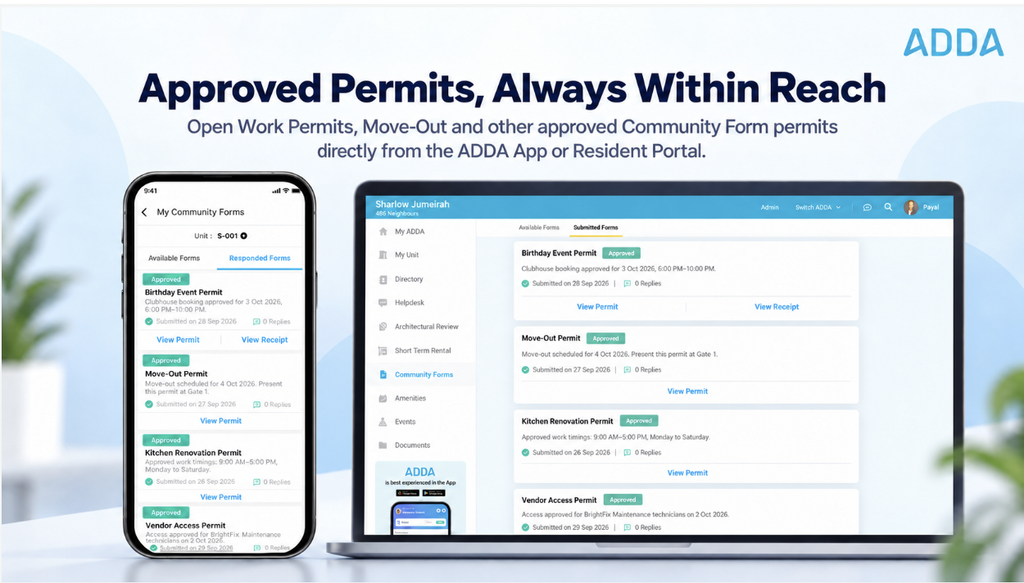
Residents can now open approved Work Permits, Move-Out and other Community Form permits directly from the ADDA App or Resident Portal instead of searching through old emails. Pasted markdown
Why it matters: Your approved permit is right where you need it—especially when you’re standing at the gate.
How can I use this?
Where: Community Forms → Responded Forms → Approved Form → View Permit
Availability: Automatic on applicable approved forms | Admin setup: Permit generation must be enabled
Product: ADDA Community Management / ADDA Rental Management
3. Invite Multiple Guests and Make Re-Entry Easier
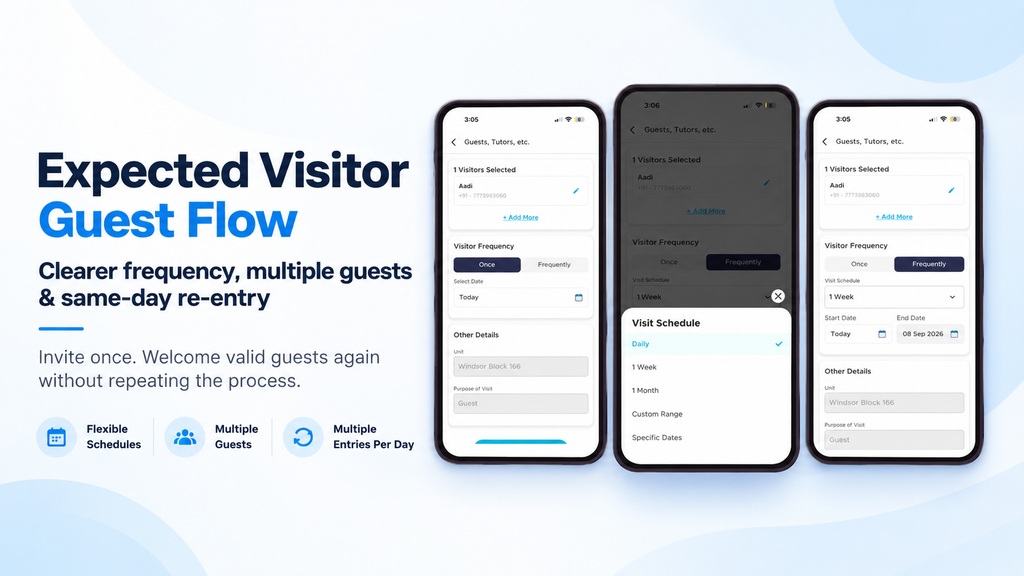
The Expected Visitor Guest Flow now offers clearer frequency options, lets residents select multiple guests together and supports multiple entries per day by default for valid guest passes. Pasted markdown
Why it matters: Fewer repetitive steps when inviting guests—and no need to create another invitation every time a valid guest re-enters on the same day.
How can I use this?
Where: ADDA App → Invite Visitors → Expected Visitor
Availability: Automatic | Admin setup: None
Product: ADDA Gatekeeper
4. Go Back to Expired Announcements
Missed an earlier community notice? Residents can now access Expired Announcements from View All, while the Home Screen continues to prioritize current information. Pasted markdown
Why it matters: Important older information stays accessible without cluttering the Home Screen.
How can I use this?
Where: ADDA App → Announcements → View All → Expired Announcements
Availability: Automatic | Admin setup: None
Product: ADDA Community Management / ADDA Rental Management
Ready to Explore What’s New?
Different ADDA customers use different products, modules, packages and integrations. As a result, not every feature in this digest will necessarily be available in every account.
Where an update works automatically, we have called that out. Where an admin needs to configure something—such as Flexi Amenities, Visitor Auto Check-Out or permit generation—we have explained the required action.
For features where the source material does not specify rollout status, commercial entitlement or additional configuration requirements, we have deliberately not assumed availability.
If you see an update that would be useful for your property or community but cannot find it in your ADDA account, contact your ADDA Customer Success representative or support@adda.io.
For additional ADDA products, packages or solutions, contact the ADDA team.